
TradeyAI Monthly Report · October 2026
Data window: 2026-10-01 to 10-31 (figures as of Oct 31, 17:50 UTC)
In October we focused on three things: making TradeyAI easier to get into, easier to start with, and easier to understand — so you can see what your agent is doing.
Two months after the new site opened, the engine has made close to 170,000 bar decisions and settled 1,697 trading rounds. Backtesting launched on September 17 and keeps growing: 201 backtests ran in the last two weeks of October, nearly three times the 73 in the last two weeks of September.
From this month on, TradeyAI has two addresses: tradeyai.io for the website and public docs, and app.tradeyai.io for the product itself.
1. Easier to get into
- tradeyai.io is now the new site (October 2): opening tradeyai.io takes you to the new site; the old one moved to v1.tradeyai.io.
- Sign in with email, no password (October 5): enter your email, then click the link in the message or type the 6-digit code.
- Website and product split (October 16): tradeyai.io hosts the website and public docs, including this report; the product moved to app.tradeyai.io, and signing in takes you straight to My agents.
- An invite link is all you need (October 21): open the link, sign in, and your account is active — no more waiting for manual approval.
- The old v1 site is retiring: it stopped running Binance agents on October 17 and posted a retirement notice on October 26.
2. Easier to start with
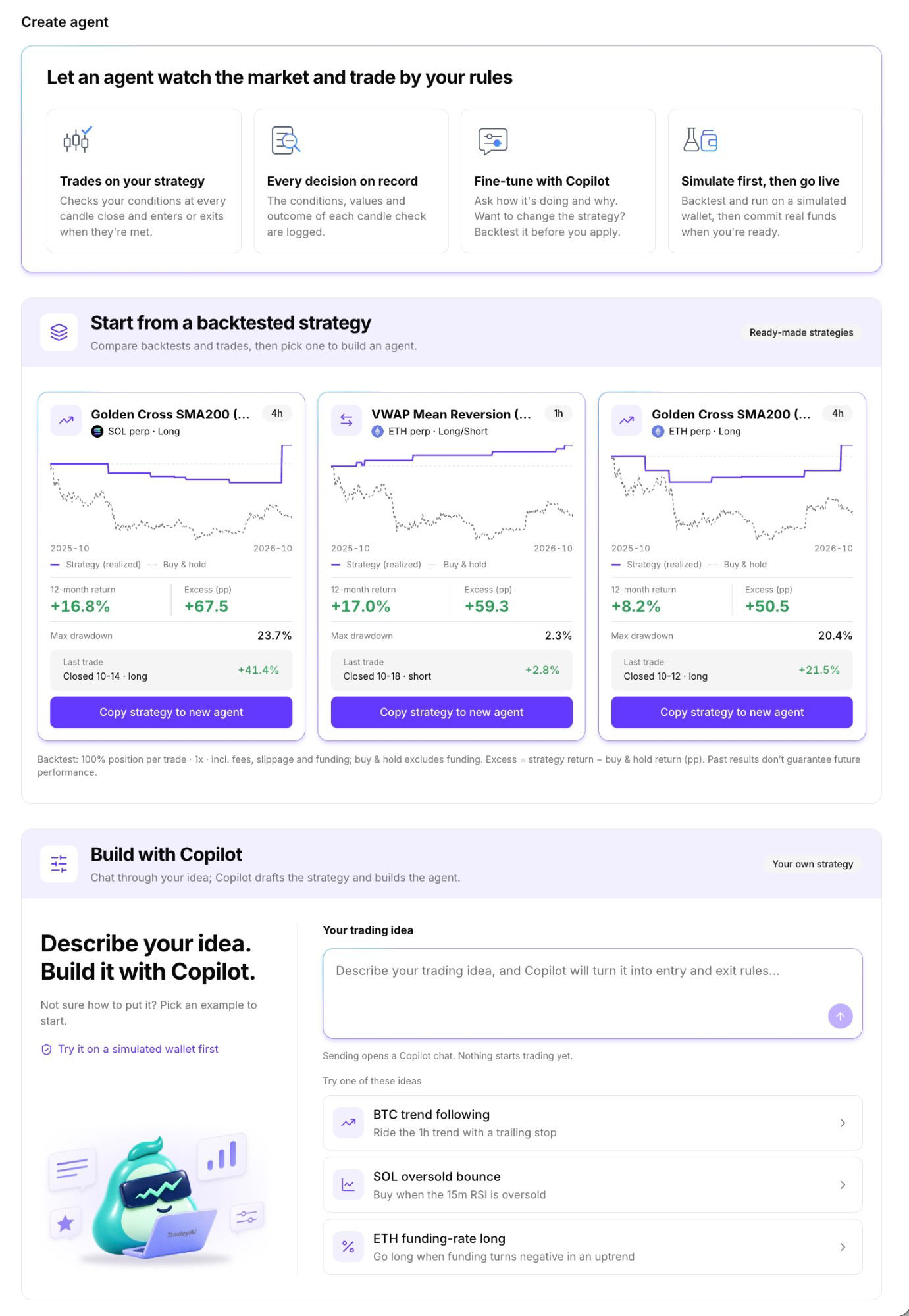
A new Create agent page
On October 31, Create agent got a page of its own. A first-time visitor can go from understanding to doing on this one page:
- See what an agent does first: four cards at the top explain how an agent trades by your rules, keeps a record of every decision, can be fine-tuned with Copilot, and runs on a simulated wallet before you decide whether to commit real funds.
- Start from a backtested strategy: the page shows the three strategies with the highest excess return. Each card shows the 12-month backtest return, excess return, max drawdown and the last trade.
- Copy a strategy in a few clicks: press "Copy strategy to new agent" on a card and activate it in three steps; before you do, you can see roughly how often the strategy gives a signal.
- Hand it to Copilot: if you have your own idea, describe it right on the page and Copilot turns it into entry and exit rules.
Example prompts that follow the market
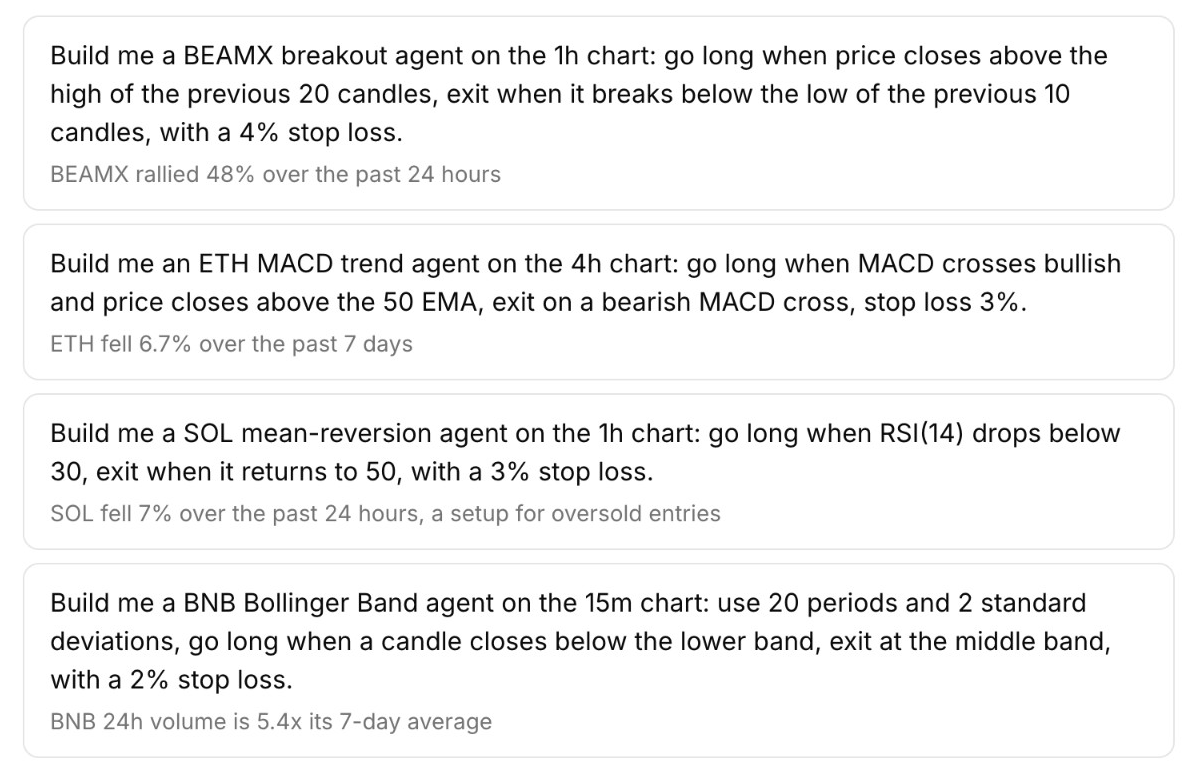
The example prompts in a new chat are regenerated every 8 hours from what is moving in the market, across all Binance perpetual contracts. Each example carries a one-line reason, such as "rallied 48% over the past 24 hours", so you know why the idea is worth trying now.
Copilot: faster, and far fewer cut-off chats
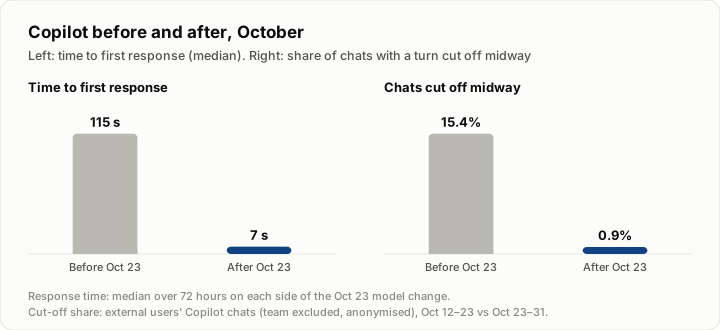
- Faster replies: after the model change on October 23, the median time before Copilot starts replying fell from 115 seconds to 7.
- Chats no longer stop halfway: the share of chats cut off midway fell from about 15% in mid-October to under 1%. Even if you close the page, lose your connection or switch apps on your iPhone, Copilot finishes the turn on the server, and the result is waiting when you come back.
- Reads the market: Copilot reads recent candles and prices and suggests parameters based on the trend. If you want a stop-loss but don't give a number, Copilot suggests one based on recent volatility (about 3× ATR).
- One step fewer to build an agent: plan cards now have a main "Create agent" button, and while Copilot works, the screen shows what it is doing and how long it has been thinking.
Set leverage when you activate
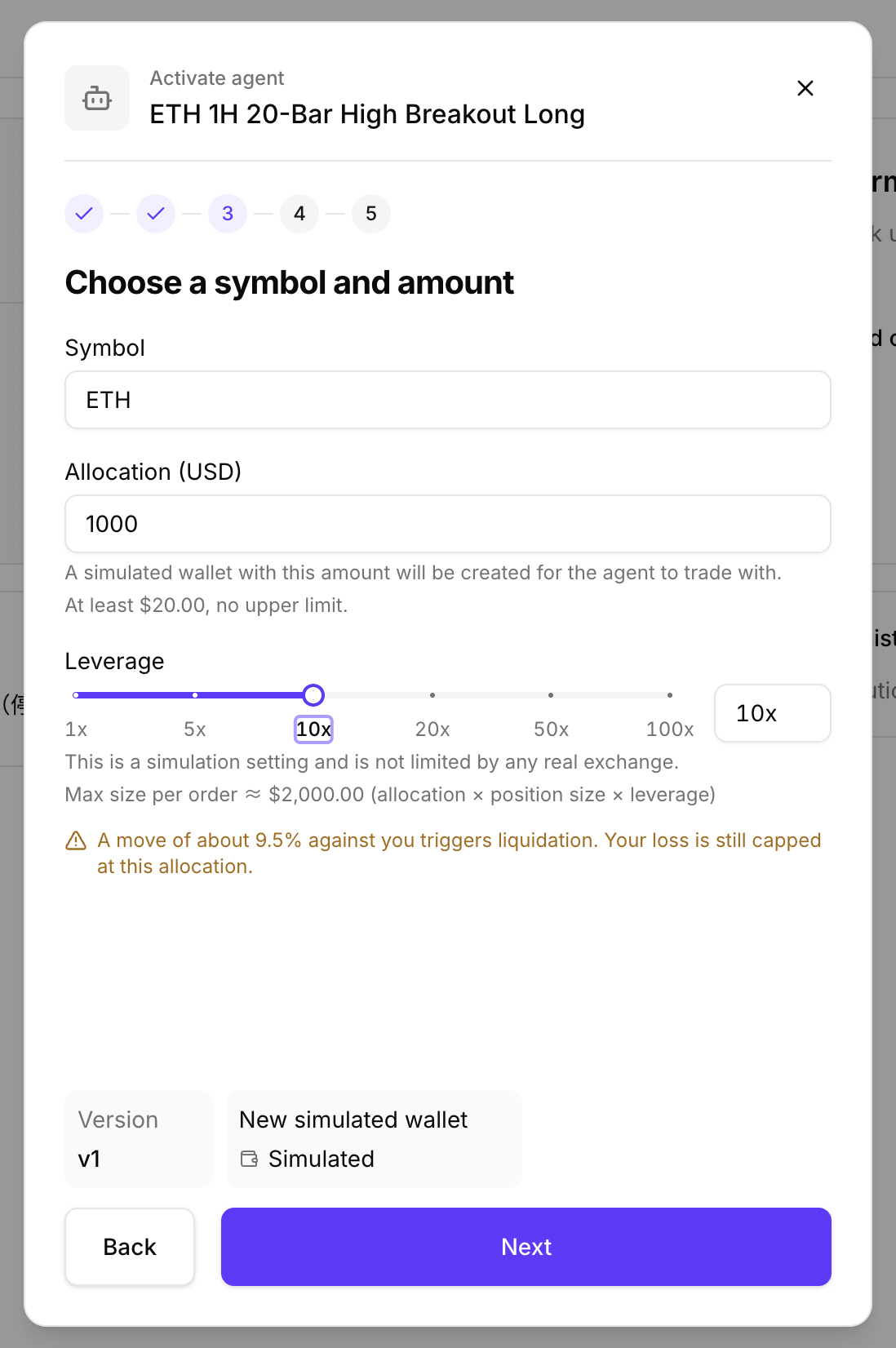
Since October 19, you can choose leverage when you activate an agent:
- See the liquidation line first: simulated accounts offer 1x to 100x. Once you pick a multiple, the window tells you how far the price can move against you before liquidation, and reminds you that your loss is capped at the allocation.
- Backtests support leverage too: rerun the same strategy at different multiples and compare the results.
- No entry if the stop-loss is beyond liquidation: such a setting means the stop-loss would never fire first, so the engine blocks the entry and explains why. Copilot checks the same rule.
Since leverage opened, about four in ten activations have used it.
3. Easier to understand
Every decision, explained on the page
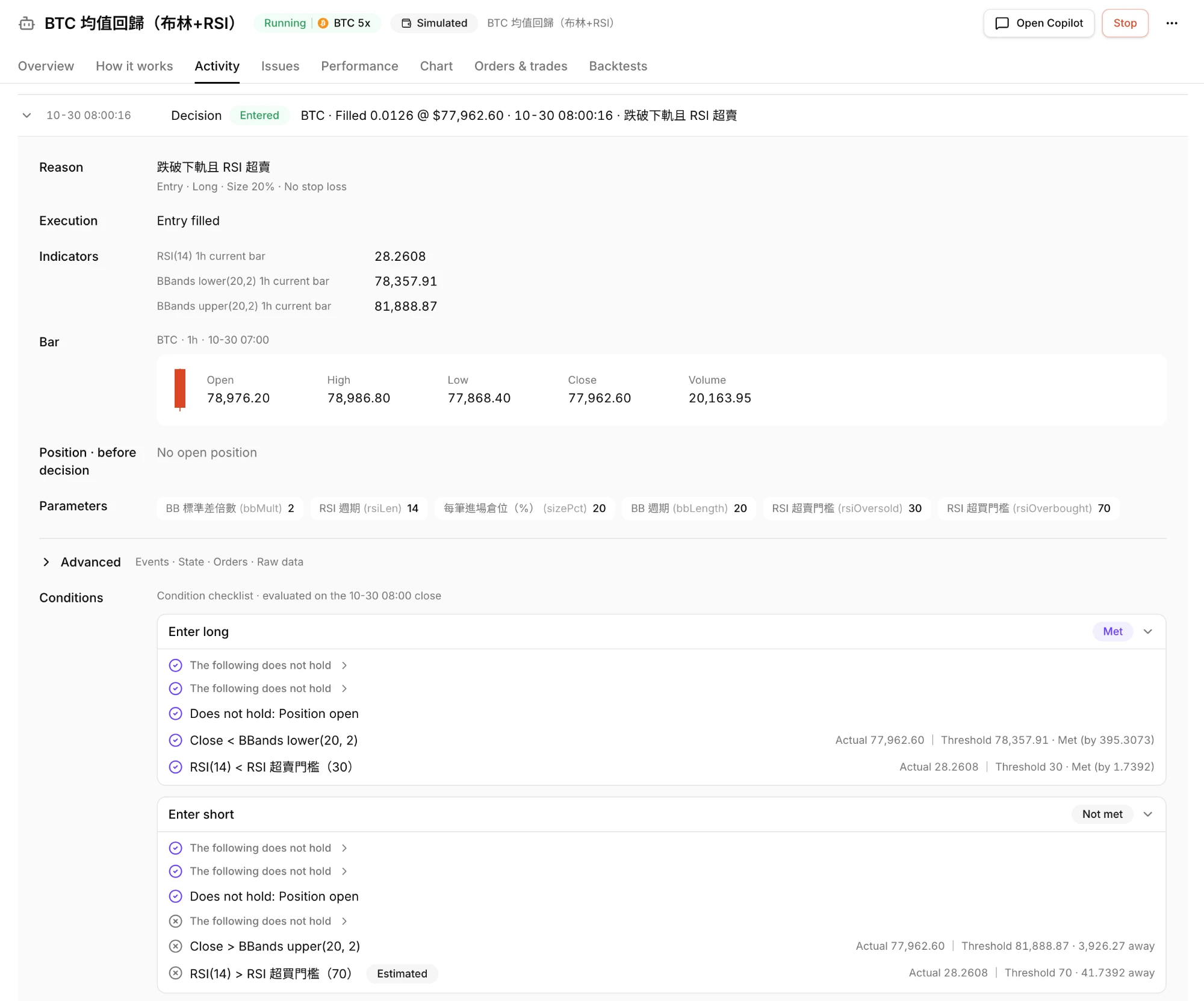
The most common puzzle with rule-based strategies is: "My agent is running — why hasn't it entered?" In October, the page started answering that directly:
- Condition checklist (October 21): every decision lists its entry conditions one by one, showing which are met and how far the others are.
- Idle hint (October 22): after 3 days without an entry, the page points to the condition that most often stood in the way, and backtests the current settings over the last 90 days to tell you how often this strategy usually enters.
- Redesigned overview (October 13): this round's P&L, the position, take-profit and stop-loss orders and the performance curve sit on one page; the position shows its stop-loss and take-profit trigger prices, and any missing protection is flagged.
- Chart tab (October 30): the chart draws the indicator lines the strategy actually uses and marks each trade intent; hover to see how it was executed.
- My agents list: search, filter and sort; an agent with a problem shows the cause and how to fix it right in the list.
Ask Copilot how a strategy is doing
- Starts from the real record: ask "How is this agent doing?" and Copilot first checks its run history; if there is none yet, it runs a backtest for you.
- Gets into the details: for a position, it reports the return and how far it is from take-profit; for activity, it explains when each fill happened and why each exit was made.
- Suggests what to change: Copilot compares recent market conditions with the trade record and suggests parameter changes; after you change them, you can rerun the backtest to compare.
4. Other updates
- Backtests closer to reality: on the web and in Copilot, you can set a backtest's start and end dates; if data is short and the range gets trimmed, the result shows both the requested and the actual range. Trading fees and funding follow Binance's actual settlement records; gaps in candle data no longer stop a backtest, but you get a warning.
- More reliable real-account orders: the engine records each order before sending it. When the exchange's response is unclear, the engine checks the actual fills and places any missing stop-loss and take-profit orders. The team has taken a real account through the full flow once: entry on October 19, exit on October 21.
- Missed candles, fixed the same day: on October 15, the data service missed four candles over about 10 minutes. Four agents skipped those decisions, and no wrong orders were placed. The same day, we added an immediate catch-up for missed candles after a reconnect.
- First simulated liquidation: the first simulated liquidation happened on October 24. Settlement of that round stalled for about 11 hours, was fixed the next day and completed.
- Security: sign-in credentials are now stored only as hashes; operation logs no longer keep any passwords or tokens; a Node.js security update went live the day after it was announced.
- Feedback gets followed up: as of October 24, test reports and in-app feedback had been organized into 123 tickets, 101 of them fixed and live (end of September: 73 and 46).
What's next
- A more capable strategy engine: scaling into positions is built and in final checks before launch. Next come trailing stops, position sizing by risk, more indicators and a weekly timeframe, and a longer funding-rate history — so strategies can express more ideas and backtests can look further back.
- Copilot keeps improving: letting the data speak, explaining analysis in plain terms, and staying with you through every step of your investing journey.
- Analysis across agents: see all your agents together — asset allocation, exposure and overall performance.